The broadcast studio for your home simulator

See the shot. See the swing that made it.

Runs alongside GSPro with broadcast-quality streaming and recording, every round tracked, and a film room that shows you why the ball did that.

Free to startWindows 10/11 64-bitFull-quality clips stay local
Plays nicely withGSPro · YouTube Live · Twitch · Any app that takes a webcam
Film Room

Ball data tells you what happened. Film Room tells you why.

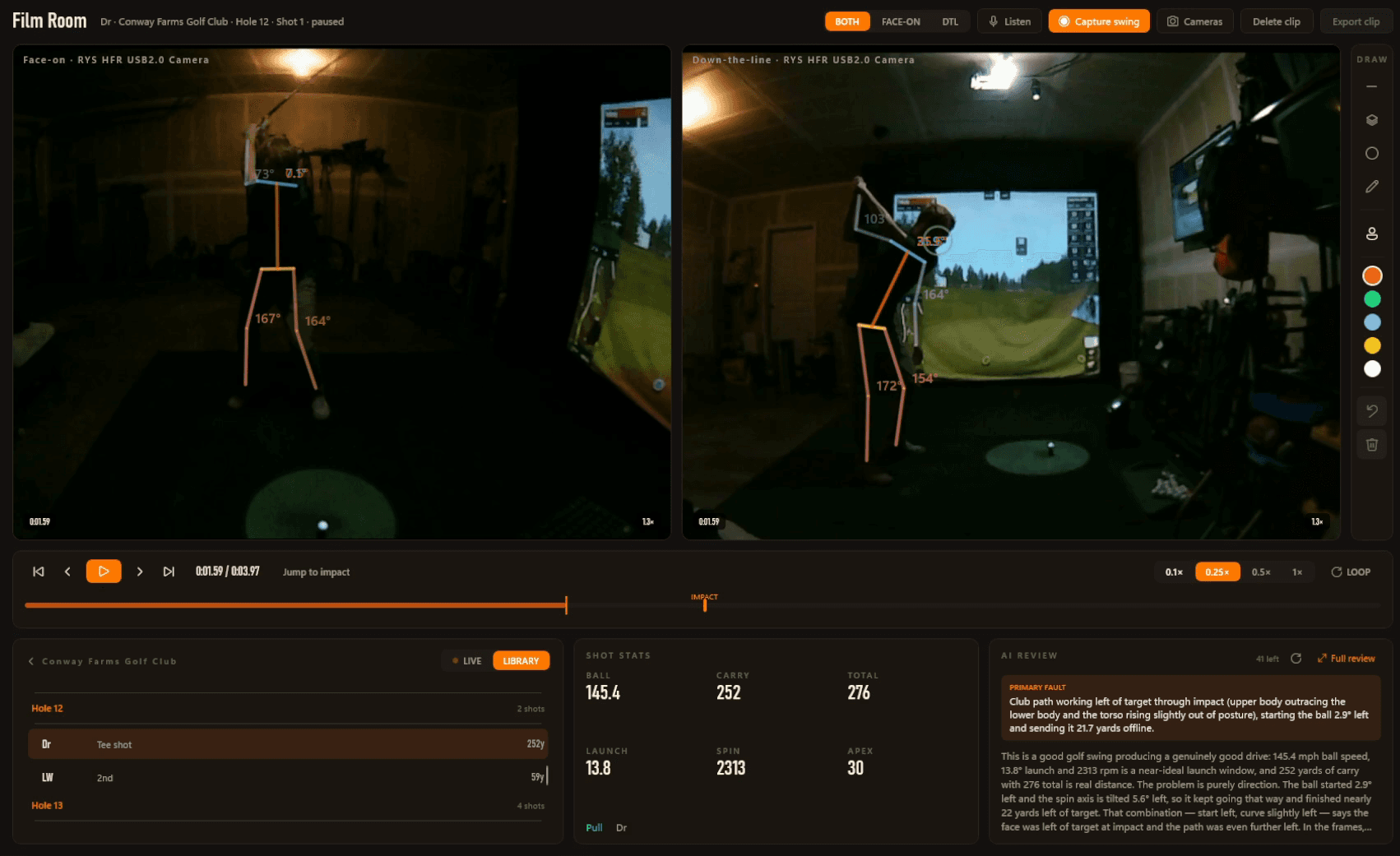
Every shot is saved with the swing that produced it — two angles, frame-synced, with your body tracked through the motion.

Film Room: two synced camera angles with the skeleton overlay, the swing timeline, shot stats and an AI review.

Measured, not eyeballed

Spine, shoulders, hips, head, lead arm and knee — with the angle in degrees.

A review that argues from your numbers

Key frames and the shot go out; a written breakdown comes back.

Your swings on your phone

Open the Film Room on the web — both angles, synced, numbers alongside.

One complete workflow

From your first shot to a lower handicap.

A single loop that carries every session from the tee to the takeaway.

Hole
Step · What happens
1
PlayPlay your round in GSPro, exactly as you do today.
2
BroadcastGo live to YouTube or Twitch, or record locally.
3
ReviewWatch every swing back in the Film Room.
4
AnalyzeBreak down every shot and every round.
5
ImproveLearn your tendencies, round after round.
Round Detail

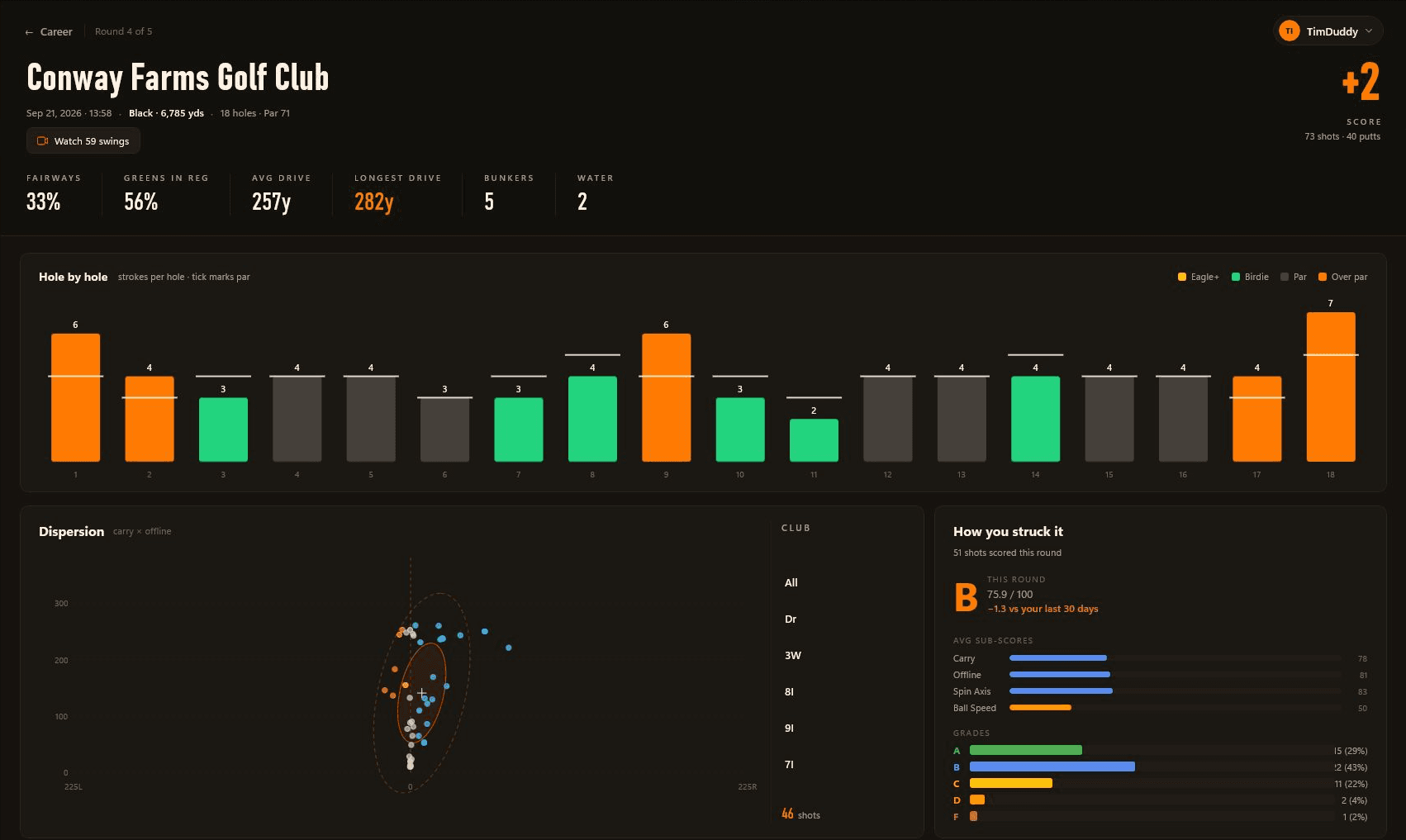
Walk back through any round, hole by hole.

How you scored, where the shots finished, and how you struck it.

A Conway Farms round in Trundle: hole-by-hole scoring, shot dispersion, and a shot-quality grade with its breakdown.
  • Hole-by-hole scoring against par
  • Dispersion map of where shots finished
  • A ball-striking grade for the round
Performance

Know what to practice next.

Your handicap, how your scoring is moving, and which part of your game is costing you shots.
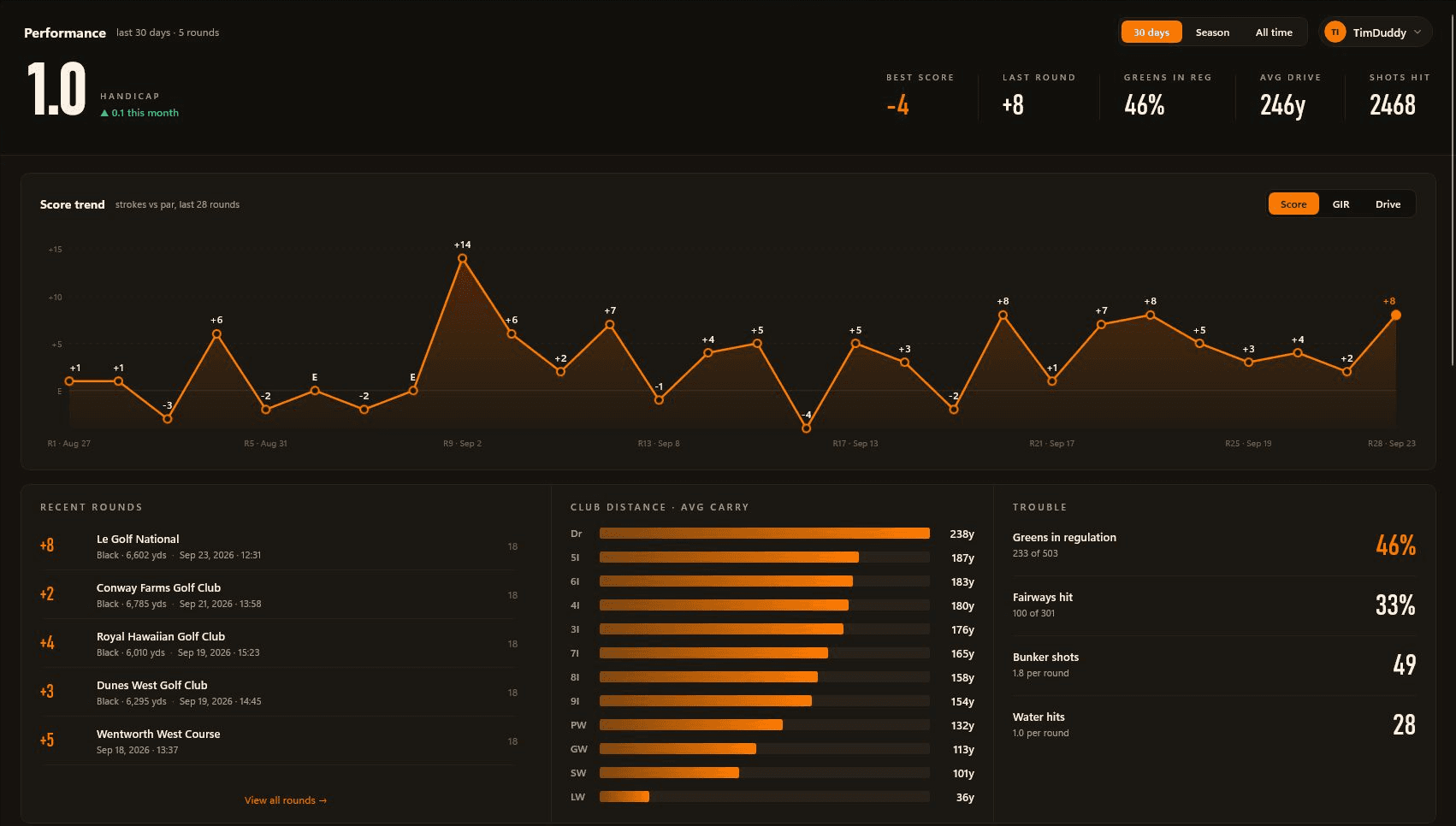
Trundle Performance showing a scoring trend, handicap, recent rounds, club carry distances, and greens and fairways hit.
  • Handicap and score trend
  • Club distances at a glance
  • Greens, fairways and trouble stats
On your phone

Every round and every swing, in your pocket.

Trundle records everything at the sim. Sign in on your phone, tablet or laptop and it’s all there to go back through — on the couch, at the range, or with your coach.

  • Every round shot by shot, with a map of each hole
  • Handicap, scoring trend and club distances
  • Both swing angles, synced, with the AI review beside them
  • Nothing to install — it's the website, signed in

Rounds sync with any account; swings on the web are part of Pro. The web shows what Trundle for Windows captures on your sim PC.
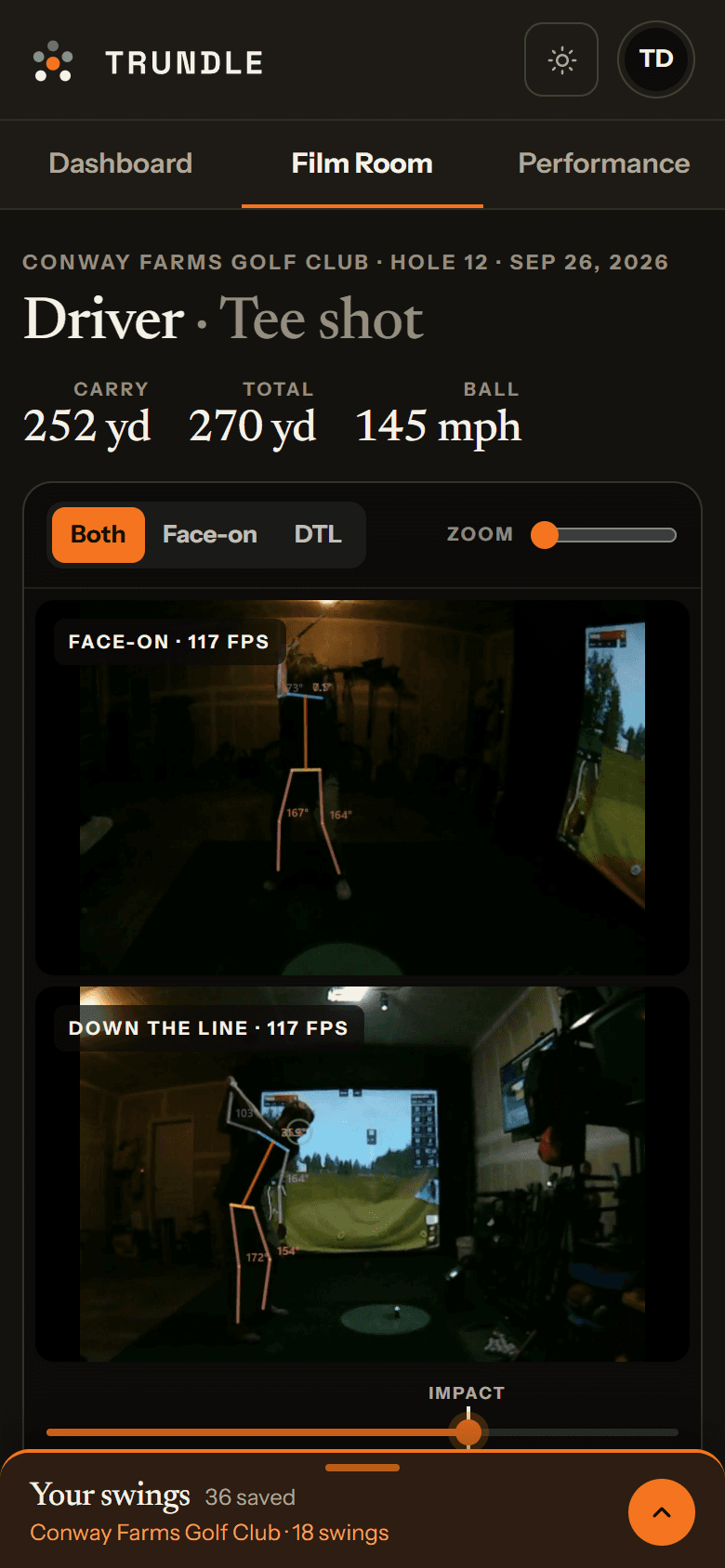
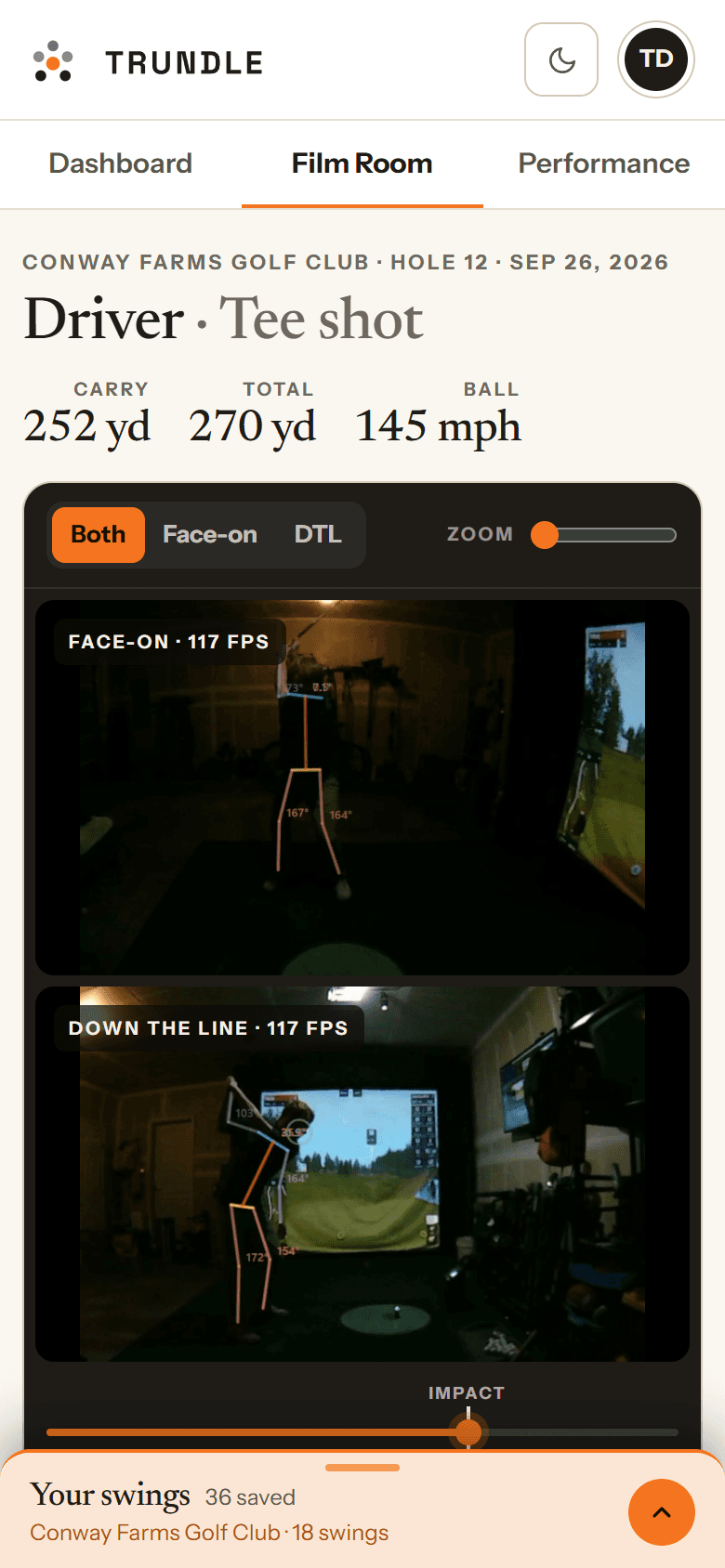
Film Room on a phone: face-on and down-the-line angles stacked, with the scrubber and the swing library.Film Room on a phone: face-on and down-the-line angles stacked, with the scrubber and the swing library.
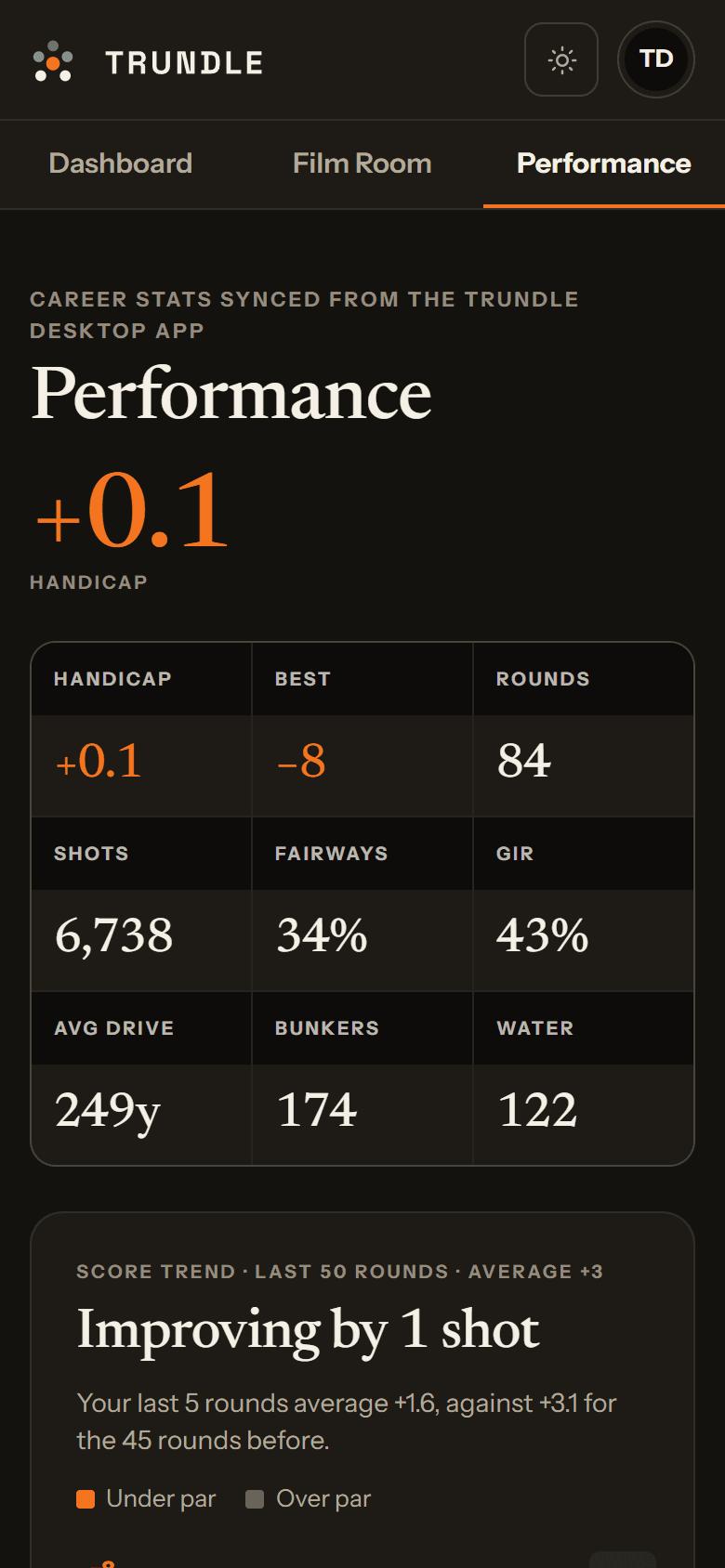
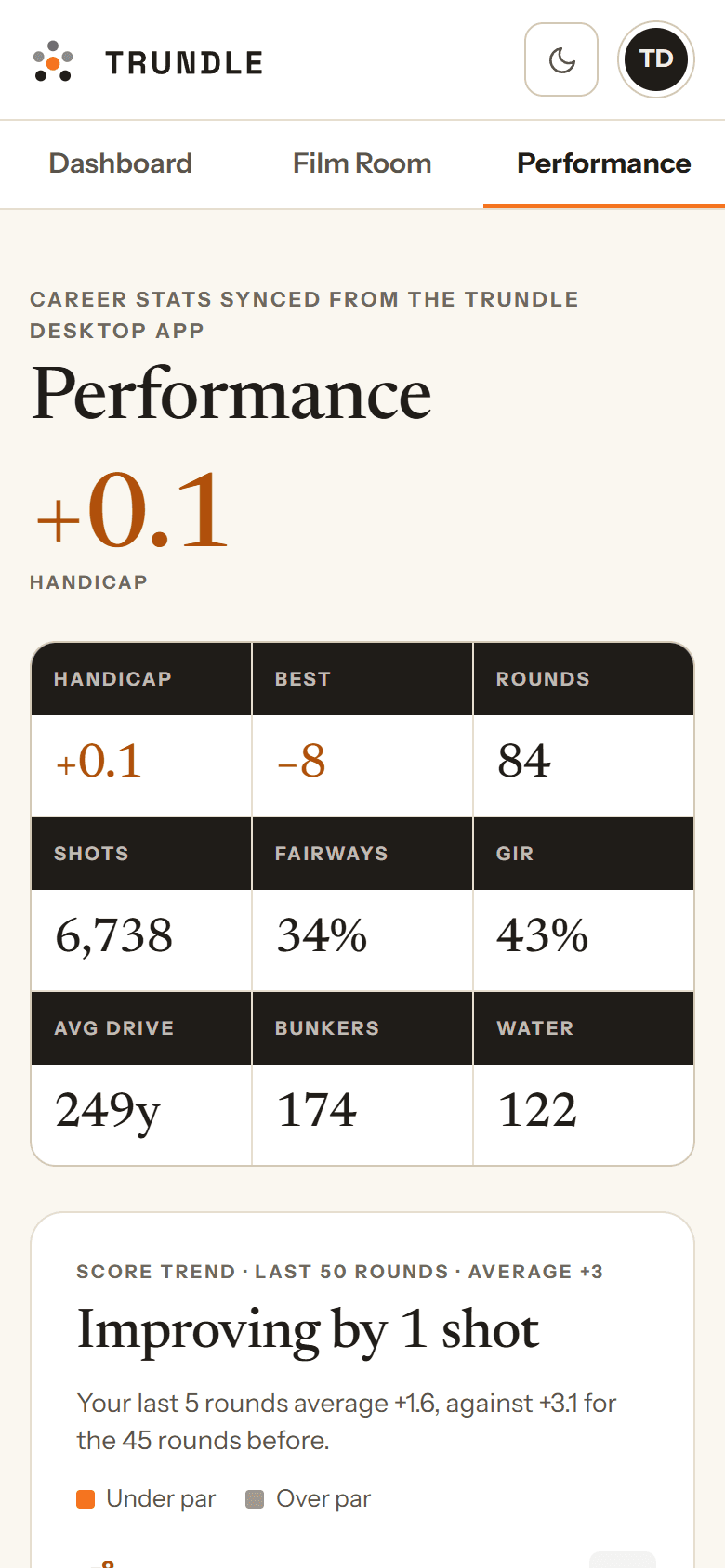
Performance on a phone: handicap, best round, rounds played, fairways, greens and average drive.Performance on a phone: handicap, best round, rounds played, fairways, greens and average drive.
Streaming & Recording

A broadcast booth, without the OBS homework.

GSPro, your cameras and the data overlay composited into one broadcast-quality output.

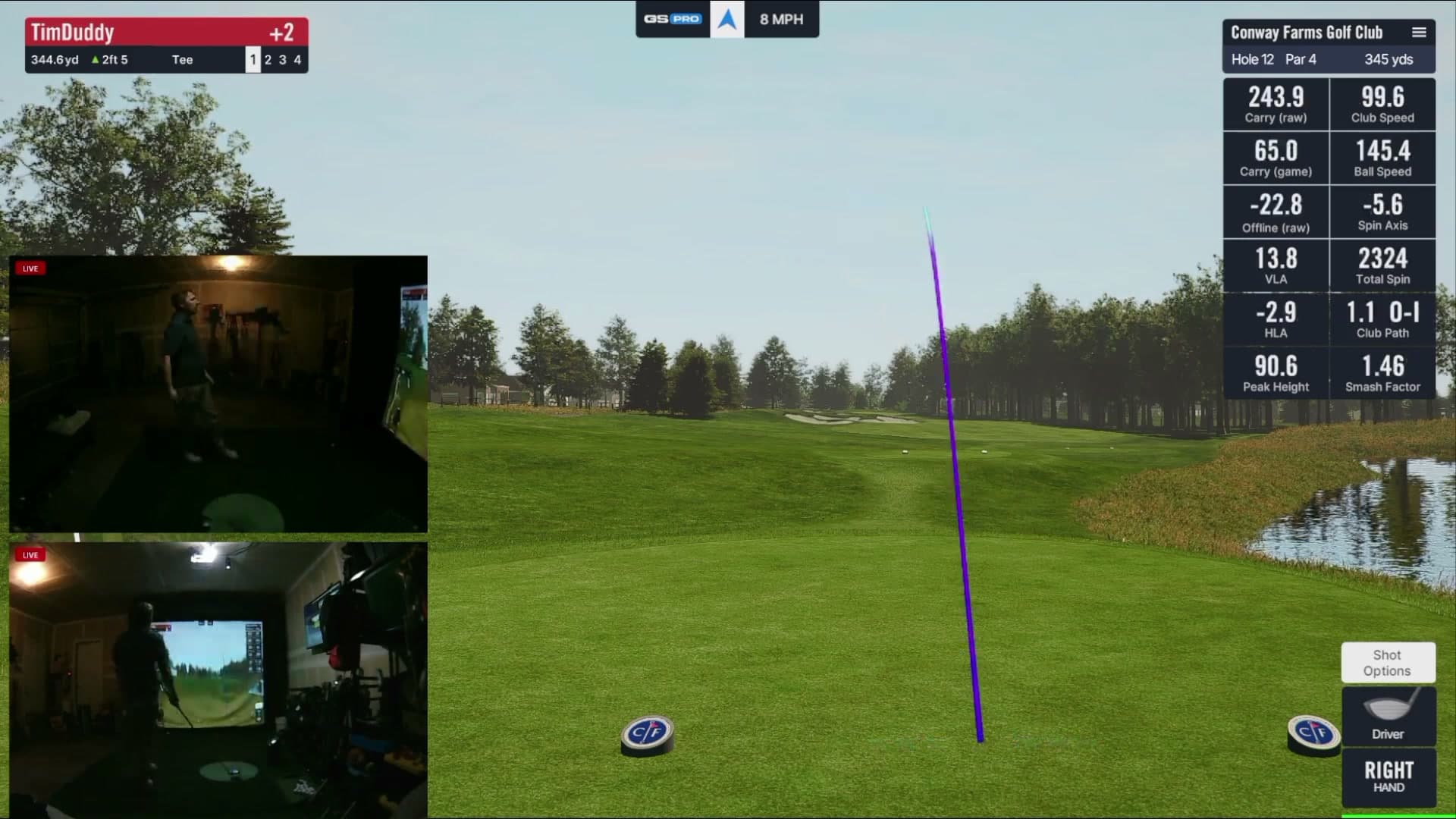
A Trundle broadcast as it went out on YouTube: GSPro with the drive's tracer, two bay cameras marked live, and the shot-data panel.
  • Go live to YouTube or Twitch from the app
  • Live chat as an on-stream widget
  • Local recording and virtual camera output
Data Dashboard

Every number, the moment you hit it.

Real-time shot data pulled straight from GSPro, in a drag-and-drop widget dashboard. No camera required.
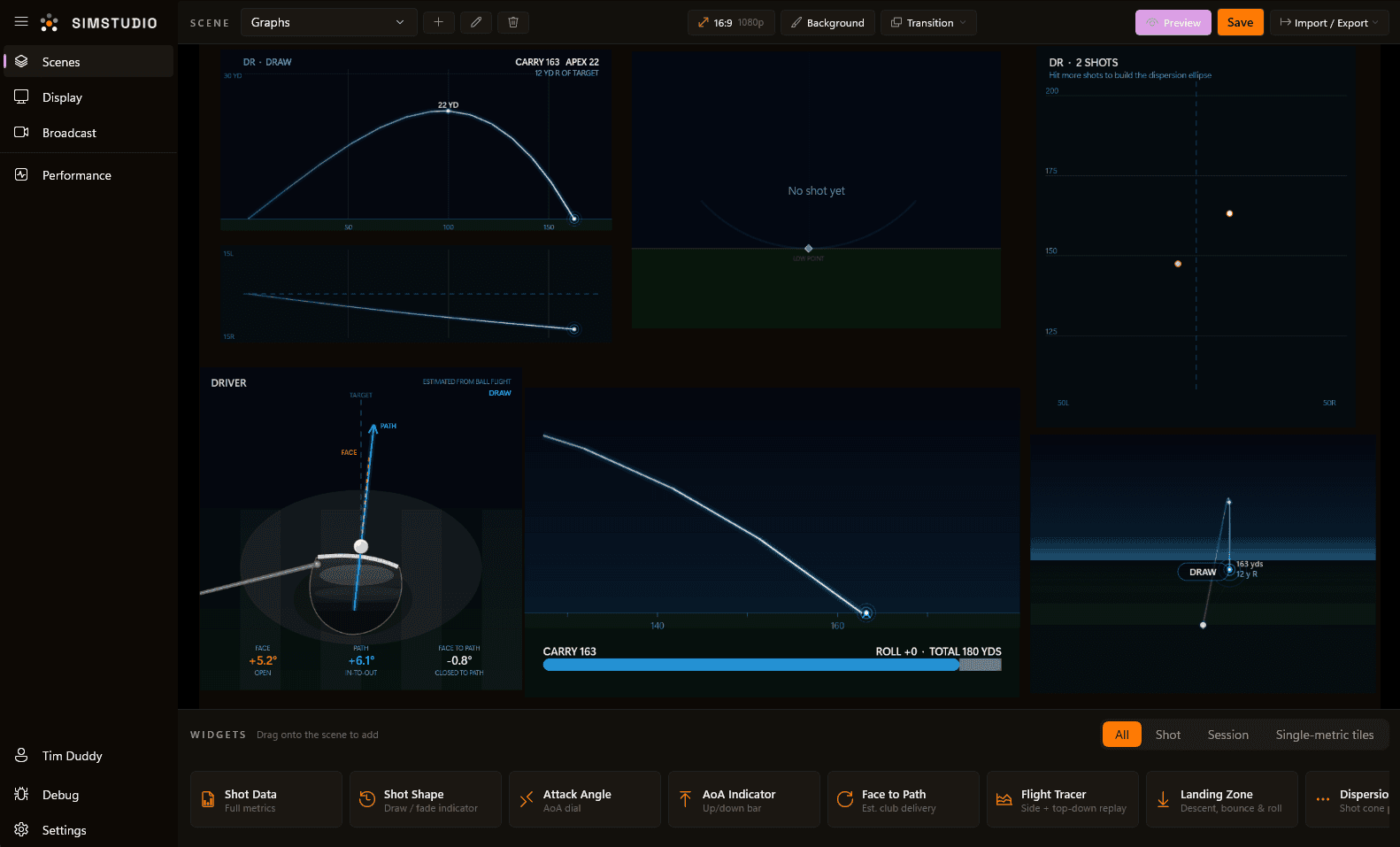
The Trundle scene editor: a data dashboard with trajectory, shot shape and dispersion widgets.
  • Ball, club and launch data, live
  • Rolling shot history for the session
  • Session statistics and dispersion

Built for everyone in the bay.

What do you want from your sim sessions?

Pick everything that applies.

Your best fit: Trundle FreeDownload free

Simple, transparent pricing

Start free. Add streaming when you want to share it, and the full Film Room when you want to fix it.

Pro

Most popular

Pro

The full Film Room when you want to fix it.

Start Pro

You’ll sign in with Google first

  • Everything in Creator
  • Film Room — two-angle replay, telestration & body tracking
  • AI swing analysis
  • Extended history & long-term trends
  • Your swings on your phone — your most recent swings, synced
Support

Questions before you download?

Do I need GSPro, and which launch monitors work?
Trundle is built specifically for GSPro, and works with every launch monitor GSPro does. It never talks to your launch monitor directly — it picks each shot up from GSPro once GSPro has recorded it. So whether you’re on Uneekor, SkyTrak, Mevo+, Bushnell, Garmin, FlightScope or Foresight, if the shot lands in GSPro it lands in Trundle, with nothing to reconfigure on the launch monitor side. Other simulator software (E6, TGC, Awesome Golf) isn’t supported today.
Does it change anything about my GSPro setup?
No. There is no mod, no plugin and nothing injected into GSPro — Trundle only reads the files GSPro already writes and captures its window the way any screen-capture tool does. It does need to run on the same PC as GSPro, side by side, which is the machine you already play on.
Do I still need OBS?
No. Scene layouts, camera sources, audio capture, streaming and recording are all built in — purpose-built for a golf bay instead of assembled out of generic sources. If you already have an OBS setup you like, Trundle can output as a virtual camera and feed straight into it.
Do I need a camera, and how many?
None at all for the data dashboard, round tracking and performance analytics — plenty of people run Trundle purely as a shot-data display on a second screen. One camera covers streaming and swing replay. Two — face-on and down-the-line — unlocks the Film Room’s synced dual-angle replay and the body-tracking measurements that need more than one view of you.
What kind of camera do I need?
Any USB webcam Windows recognises, plus capture cards and action cameras that present themselves as one. For swing replay, frame rate matters far more than resolution: 720p at 120fps is the sweet spot, and a 30fps camera will smear through impact no matter how many megapixels it has. Trundle lists the formats each connected camera actually supports, so you can check what yours can do before buying another one. If you run two high-frame-rate cameras, spread them across separate USB ports rather than one shared hub.
Where does my footage go? Is anything uploaded?
Everything is recorded to your own PC, and your full-quality clips stay there. Three things can leave it, all tied to your account. Sign in and your round history syncs so you can see it on the web (you can switch this off). On Pro you can turn on clip syncing, which uploads a small copy of each swing so you can watch it on your phone. It is off by default and private to you. Your most recent swings are kept, and the oldest are replaced as new ones arrive unless you star them. And AI swing analysis sends a handful of frames from the swing you asked about, only when you ask for it. Local clips are trimmed to the swing itself, and retention settings age old ones out so the folder doesn’t quietly grow forever. Full detail is in the privacy policy.
What are the system requirements?
Windows 10 or 11, 64-bit, on the PC running GSPro. In practice a machine that runs GSPro comfortably runs Trundle alongside it. For streaming and recording, a GPU with a hardware video encoder (NVIDIA NVENC, Intel Quick Sync or AMD AMF) is strongly recommended — Trundle uses whichever you have and falls back to CPU encoding if you have none. Encoding on that dedicated encoder is separate silicon from the part rendering GSPro, so it isn’t competing with your frame rate.
Is there a Mac version, or can I use just the website?
Trundle itself runs on the Windows PC with GSPro, because that’s where the shots, the cameras and the stream are. The website is the other half: sign in on any phone, tablet or computer, Mac included, and your rounds and stats are there, with your swings and their AI reviews on Pro. It shows what the desktop app captured, so it needs Trundle running on your sim PC to have anything to show.
Is there a free version?
Yes, and it isn’t a trial. The real-time data overlay, configurable scene layouts, swing camera replay, virtual camera output and session history are free, with no account required. Paid plans add streaming and recording (Creator), then the Film Room, AI swing analysis, your swings on your phone and long-term history (Pro) — those sign in with Google.
Can I cancel, and what if it isn't for me?
Cancel any time from your account page — you keep the paid features until the end of the period you have already paid for. And if it turns out not to fit your setup, any purchase is refundable within 14 days, no reason needed. See the refund policy.

Your next session, on film.

Free to start · Windows 10/11 64-bit · Runs alongside GSPro

Download for Windows